
 PrimeX Meta
Features · from Nova's own list
Everything Nova can do
All 192 features in plain words, area by area, each with how it works underneath.
- Live 164
- Being built 4
- Planned 15
- Idea 9
As of 28 October 2026, from Nova's own list.
All 192 features in 14 areas.
The brain
Claude models, a memory of what matters, and skills Nova writes for itself as it works.
8 of 8 live
The right Claude model for each request
Nova picks a model for each request.
Memory, and skills it learns by itself
Nova remembers what matters about Aman and his preferences from one conversation to the next.
New conversations know the work in progress
When Aman starts a fresh conversation on any channel, Nova still knows what work is running and which tasks are unfinished.
All 8 in this area
One laptop, one assistant
LiveNova is Aman's own AI assistant, living on his laptop. Three parts work together. Hermes Agent is the brain that thinks and acts. n8n runs the fixed automations with outside services. Claude Code builds and looks after all of it.
How it works: One laptop, one assistant
The brain runs all the time and thinks with Claude models. A small Nova backend runs the dashboard window and passes requests to the brain. n8n runs on the same laptop.
Its own personality, and it knows who Aman is
LiveNova has its own name and personality, and it knows who Aman is: his work, his products and his YouTube channel. Ask who it is and it introduces itself in two or three sentences, to Aman or to anyone else.
How it works: Its own personality, and it knows who Aman is
At the start of every conversation the brain reads a persona file. That file holds Nova's character, facts about Aman taken from his own website, and how Nova should introduce itself. Nova is told that everything it says about itself must be true.
The right Claude model for each request
LiveNova picks a model for each request. Everyday help goes to fast Claude Haiku, research and decisions go to Claude Sonnet, and building and code go to Claude Opus. The conversation stays the same, so nothing is forgotten when the model changes, and the chat shows which model took the request.
How it works: The right Claude model for each request
Before a dashboard request (typed or spoken) reaches the brain, a tiny judge model sorts it in about a third of a second, with simple word rules as a backup. Only that one run changes model. The chat shows a line such as "Opus 5.5 takes this one (building and code)." On Telegram, Aman switches models himself with /model.
Helper agents on Opus
LiveFor bigger jobs Nova can split the work and hand parts to helper agents. The helpers run on Claude Opus, the strongest model.
How it works: Helper agents on Opus
Hermes can start helper agents by itself. On 14 October Aman set their model to Opus 5.5. Nova decides for itself when helpers are worth it, so on small jobs it often does the work alone.
Memory, and skills it learns by itself
LiveNova remembers what matters about Aman and his preferences from one conversation to the next. It also writes and improves its own skills (step-by-step know-how) as it works, with better steps and fixes it found along the way. Aman's rule: Nova keeps learning by itself and tells him afterwards.
How it works: Memory, and skills it learns by itself
After each conversation the brain reviews it and updates Nova's notes about Aman. Nova and a built-in skill keeper edit its skills. Every change is recorded, and the old version is kept. Each change is one line on the Chat page, and every evening at 21:00 Aman gets one short Telegram message listing what Nova changed in itself that day (none on a day without a change). The lines name a skill or say "its notes about you", never what a note says.
New conversations know the work in progress
LiveWhen Aman starts a fresh conversation on any channel, Nova still knows what work is running and which tasks are unfinished. Starting over with /new no longer loses the work.
How it works: New conversations know the work in progress
The backend keeps a short register of running background work and the open task list. A small add-on in the brain gives that register to Nova at the start of every new conversation.
Always on, and back by itself after a restart
LiveNova starts with the laptop and comes back by itself after a restart: the brain, Telegram, WhatsApp, n8n and the dashboard. On 18 October a restart brought everything back without anyone touching it.
How it works: Always on, and back by itself after a restart
Nova's services start when the laptop boots and restart by themselves if they crash. A health-check tool checks connections, keys, disk and memory. Planned restarts happen only when Nova is idle, so no request is cut off.
Automation tools ready right after a restart
LiveAfter a restart, Nova has its n8n automation tools at once, instead of missing them for about 8 minutes.
How it works: Automation tools ready right after a restart
Since 18 October the brain starts after n8n and waits up to a minute for it to be ready. If n8n is missing, the brain still starts.
Nova Desktop
The dashboard where every step shows while Nova works: Home, chat, tasks, mail, projects and more.
48 of 48 live
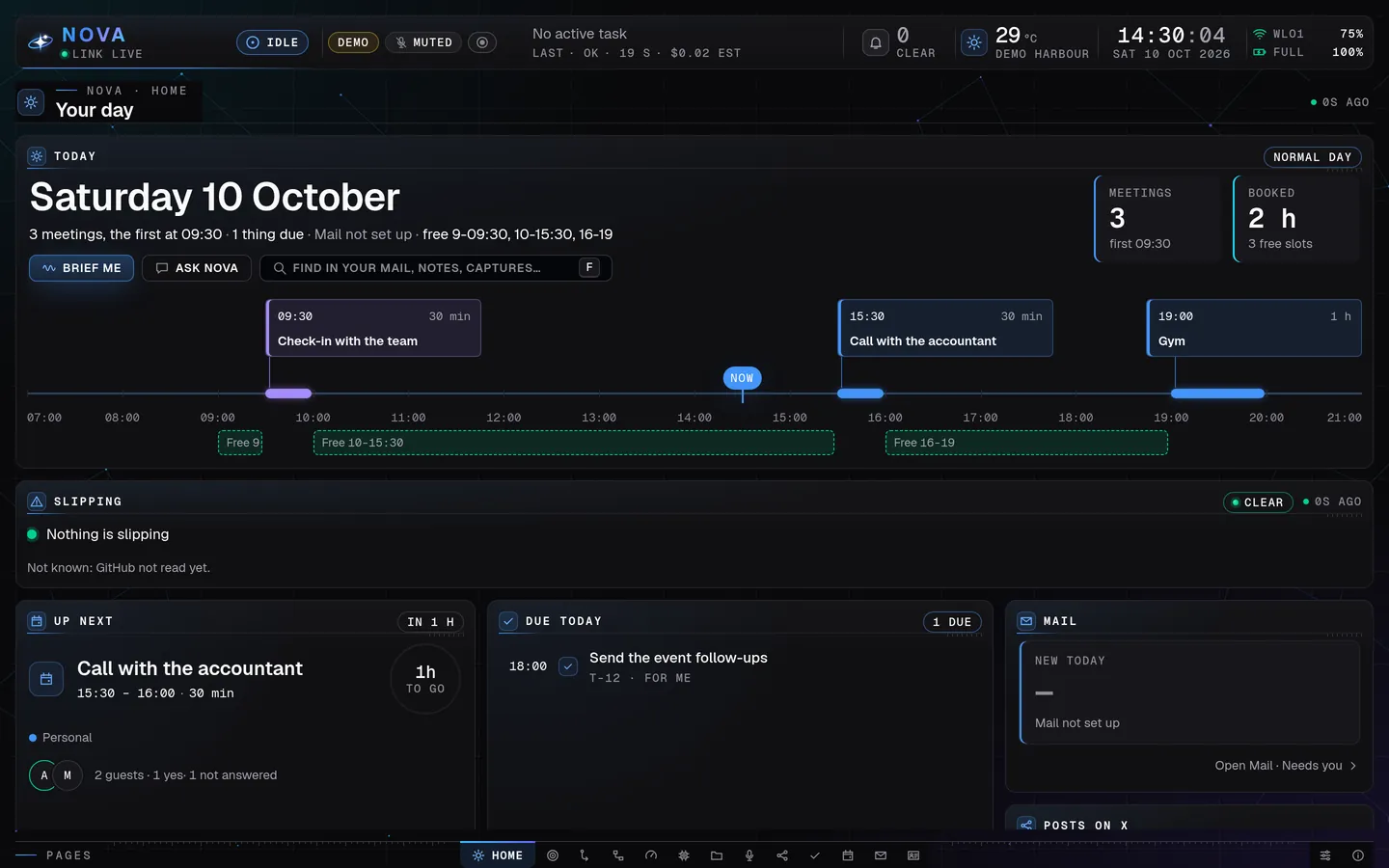
Home, the page Nova Desktop opens on: your day at a glance. Demo mode, made-up data · Home: your day at a glance
Every Nova window now opens on Home, Aman's day: a Today card with the date and one line about the day, the day's meetings as cards on a…
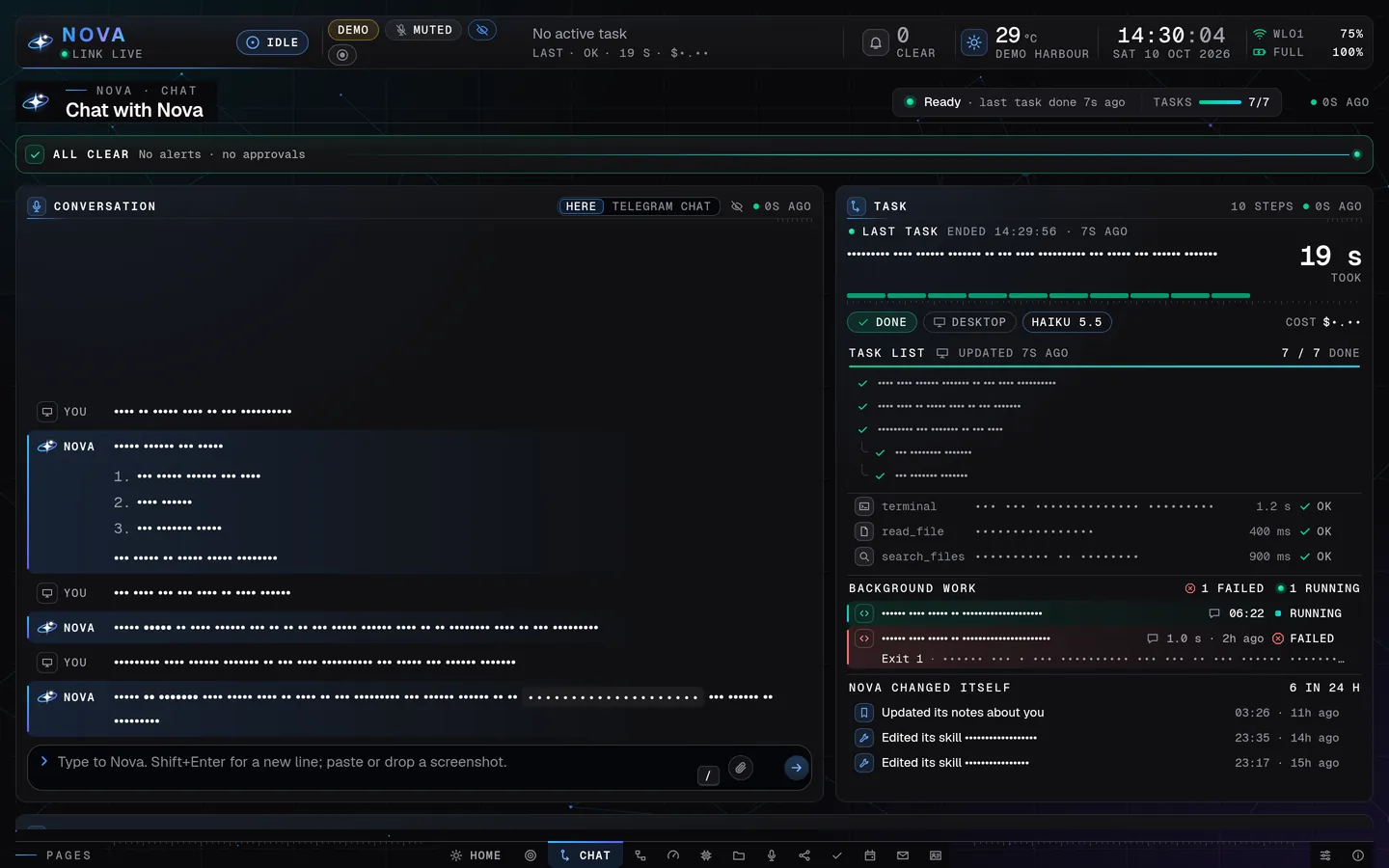
Chat, with the task panel: every step shows while Nova works. Demo mode, made-up data · Task panel: every step live
Aman sees exactly what Nova is doing: the task, where it came from, the model, a ticking timer and one row per action.
Presentation mode (key P)
One key hides everything private on the dashboard, so Aman can film or share his screen safely.


All 48 in this area
Nova Desktop, Nova's own window
LiveNova has its own full-screen, Jarvis-style control window. It shows what Nova is doing, what it costs and how the laptop is doing, all in one place.
How it works: Nova Desktop, Nova's own window
A small backend on the laptop collects live data and sends it to a window that opens like an app.
Boot sequence
LiveWhen the window opens, Nova "powers up" in 2.4 seconds like a movie HUD, with a soft start-up chord.
How it works: Boot sequence
The background grid fades in, the centre core lights up and its rings draw outwards, the bars draw their corners, the panels slide in from both sides, the gauges sweep up from zero, and the state chip says ONLINE. Any key skips it. Reopening within 15 minutes is quicker, and with reduced motion it is a short fade.
The Nova orb
LiveIn the centre of the Home page is Nova's animated symbol: a four-point star with a tilted orbit ring. Its colour and motion show Nova's state at a glance.
How it works: The Nova orb
It is drawn live, not played from a video. Idle is a slow blue breath. Listening is cyan and reacts to the voice. Thinking is indigo to violet with a sweeping light. Speaking is a bright blue pulse that follows the voice. Working shows green-to-cyan beams. Waiting for approval is amber and still. Error is red, and offline is grey. Beside the orb, the left side shows the voice (microphone, sound level) and the right side shows the work (current tool, step, time, model and a Stop button).
Home: the whole picture on one screen
LiveThe Home page shows everything at once. On the left: the laptop's health, Nova's services and costs. In the middle: the orb, the conversation and the current task. On the right: alerts, projects, automations and scheduled jobs.
How it works: Home: the whole picture on one screen
Three columns, plus a bottom strip for recent messages and the event log. Panel sizes adjust to the screen, and on smaller windows the columns fold into tabs. Since 26 October this page is called the Dashboard: it opens on a calm overview (below), and All panels brings these three columns back.
Live laptop vitals
LiveAman sees how his laptop is doing in real time: processor, temperature, memory, disk, battery and network.
How it works: Live laptop vitals
The backend reads the machine every second and every five seconds. The panel shows processor load with a 60-second chart and one meter per core, plus graphics, temperature, rings for memory, swap, disk and battery, Wi-Fi signal, and download and upload speed. Amber and red appear only when a reading is really too high or too low.
Service health
LiveOne look shows whether every part of Nova is working: the brain, the automation engine, the backend and the other services.
How it works: Service health
The backend really tests each service and shows one row each with a green dot, plus a summary such as "7/7 OK". A service that is down turns red, and the bottom bar shows a red count.
Top status bar
LiveThe bar along the top shows Nova's name and state, its link to the backend, mode badges, the current task, how many things need Aman, the local weather, the clock, network and battery.
How it works: Top status bar
The NOVA wordmark is in the brand gradient, with a state pill such as THINKING or NEEDS APPROVAL. A MIC badge shows whether Nova can hear, and a click switches the microphone. ECO, PRESENT and DEMO badges show the active modes.
Page bar with live signs
LiveA slim bar along the bottom holds Nova's pages: Home, Chat, Automations, Usage, System, Projects, Social, Calendar, Settings and Help. Small marks show where something needs Aman.
How it works: Page bar with live signs
Click a page name, or press its key: Ctrl+1 Home, Ctrl+2 Chat, Ctrl+3 Automations, Ctrl+4 Usage, Ctrl+5 System, Ctrl+6 Projects and Ctrl+8 Social (Ctrl+7 is kept for the coming Voice page). Calendar, Settings and Help open from their tabs, and Help also with the ? key. Home shows a count of approvals and alerts, Chat breathes while Nova works, Automations counts failed runs, Usage warns about its figures, and System counts services that are down. The page never switches by itself. The small mark on a Home panel opens that panel's full page.
Chat with Nova in its own window
LiveAman types or speaks to Nova on the Chat page. From there Nova can use everything: the terminal, files, code, the web, its own browser, and his apps on screen. Answers are easy to read, with headings, lists, tables and code blocks drawn properly.
How it works: Chat with Nova in its own window
The window talks to the local backend, which starts each request on the brain and streams the steps back. The text box takes several lines: Enter sends, Shift+Enter starts a new line, and half-typed text follows Aman between pages. Long answers fold with "Show all". A web address in an answer becomes a small chip with the site's real name, and a click shows the whole address. It is never a live link and nothing is fetched for it, for safety. An "Open in browser" button waits for Aman's yes (one switch).
Send screenshots to Nova
LiveAman can give Nova a picture in the chat, such as an error on screen or a design, and ask about it.
How it works: Send screenshots to Nova
A paperclip, a paste (Ctrl+V) or drag and drop attaches up to four pictures. They stay on the laptop, and Nova opens them with its own tools. The chat shows "[1 screenshot attached]".
Plan visualizer
LiveWhen Aman says "create a plan for ...", Nova draws the plan beside the chat as a timeline of phases and step cards, which can be printed or saved as a PDF.
How it works: Plan visualizer
Nova ends its answer with the plan in a fixed format, and the backend keeps it. The Plan panel shows each step with its status in words (to do, doing, done), who owns it and a note. Nova can tick steps off in the same plan later.
Task panel: every step live
LiveAman sees exactly what Nova is doing: the task, where it came from, the model, a ticking timer and one row per action. A Stop button halts it.
How it works: Task panel: every step live
Each action (terminal, browser, search and so on) is a row, and helper agents' work is nested under it. A finished task shows DONE or FAILED, how long it took and roughly what it cost. Work started from Telegram, WhatsApp or a schedule shows too, with its channel.
Live title row and working line
LiveNext to "Chat with Nova", a small animated Nova mark and one line say what Nova is doing right now, for example "Running terminal · git log … · 00:12".
How it works: Live title row and working line
The mark breathes when idle, sweeps when thinking, rings when acting, and turns a still amber when it waits for Aman. Until the answer's first words arrive, a working line under the chat shows the current action, the time and the number of steps. It says HELD while waiting for approval.
Approval card with Y and N
LiveWhen Nova needs Aman's OK before an action, an amber card shows exactly what it wants to do and why, with Allow and Deny. He can also press Y or N.
How it works: Approval card with Y and N
The card shows on Home and on Chat. On any other page a line under the top bar says "Nova needs your approval" with a "Show it" button, and the page never jumps by itself. Y works only when pressed on its own, after a quiet second, so typing a sentence never approves anything.
Alerts
LiveProblems show as alerts: amber for a warning, red for something critical. When nothing is wrong, a calm green "ALL CLEAR" bar shows.
How it works: Alerts
Each alert is a card with an icon and a word, never colour alone, and an acknowledge button. Key A jumps to them, and Home's tab shows how many are open.
Notification sounds
LiveEight short, distinct tones tell Aman from across the room that Nova heard him, finished, failed or needs an answer.
How it works: Notification sounds
The tones are made inside the page (no sound files, no cost), each under a quarter of a second: heard, done, failed, approval, warning, critical, wake and boot. At night only approvals and critical alerts sound, unless Aman is at the laptop. Key S mutes them all.
Presentation mode (key P)
LiveOne key hides everything private on the dashboard, so Aman can film or share his screen safely.
How it works: Presentation mode (key P)
Press P, or switch it on in Help. Conversation text (Nova's answers included), messages, commands, job names, costs, file names and calendar titles turn into dots, while the layout, counts and animations keep moving. A PRESENT badge shows in the top bar, and only the important sounds stay on.
Keyboard control
LiveEverything has a key: / or Ctrl+K to type, V to talk, M for the microphone, S for sound, P for presentation, A for alerts, E for eco, R for reduced motion, ? for help, Ctrl+number for the pages, and Esc to stop.
How it works: Keyboard control
A single letter acts only when pressed on its own, after a one-second wait (the bottom bar names the key meanwhile). A sentence typed into the window by mistake does nothing, and the bar says "Press / to type to Nova".
System page
LiveA full view of the laptop and Nova's services, with the things Home has no room for.
How it works: System page
Larger vitals charts, every service with its own sentence, facts about the laptop (uptime, fans, disk temperature, firewall on), the five busiest programs, and the whole event log with an "All / Warnings" filter.
Projects and the plan
LiveEvery project, and every milestone of building Nova, with its status and a plain-English sentence on where it stands.
How it works: Projects and the plan
The page reads the project list and the milestone list (M0 to M26). Milestones can be filtered as Active, Blocked, To do or Done, and a project that has been quiet for seven days is marked STALE.
Scheduled jobs
LiveThings Nova does on a schedule (reminders, daily checks, scans) are listed with a live countdown to the next run and how the last run went.
How it works: Scheduled jobs
The dashboard reads Nova's scheduler. The next job is highlighted with a ticking countdown. Paused jobs are grey, a failed last run is red, and a missed time is marked "late". By design, nothing can be paused or run from the window.
Help page
LiveA built-in guide with all the keys, one-click switches and the list of voice commands. It works even when Nova's brain is down.
How it works: Help page
It holds an owner's guide (still a first draft), the key table, switches (presentation, sound, reduced motion, eco, microphone, developer tools), a "Right now" status and "What you can say". The ? key opens and closes it.
Battery-friendly power modes
LiveThe dashboard tones down its animations by itself on battery, when the laptop is hot, or on request, so it never slows the laptop down.
How it works: Battery-friendly power modes
Full mode runs the orb at 60 frames a second. Eco mode (on battery, when hot, when frames are slow, or with key E) drops to 30 or 10 and removes the glow. In the background it drops to 15, when hidden it stops, and after 10 idle minutes the decorations dim. Key R gives reduced motion.
Compact widget
LiveMade small, the window turns into a mini widget: a small orb, Nova's state, the current step, alerts, microphone, link and today's cost.
How it works: Compact widget
Below a certain window size the full layout switches to a slim widget that keeps the essentials in view beside other work.
Honest states, never fake numbers
LiveWhen the window loses its link to Nova, or a source can't be read, it says so in words instead of showing old or made-up numbers.
How it works: Honest states, never fake numbers
An amber or red "LINK STALLED" or "LINK DOWN" banner shows the time of the last data and the next retry. Panels say "Not connected yet" or "Not readable right now" in the backend's own words.
Demo mode with made-up data
LiveThe dashboard can run on invented data, so every feature and state can be shown on video without any real private information.
How it works: Demo mode with made-up data
Open the window's address with
?demo=1(ordemo=today,demo=empty). Extra switches show a chosen orb state (for examplestate=thinking), an approval card, a long answer, an error or a lost link. No backend is needed.The look: Aman's own brand
LiveEverything Nova shows uses the look of Aman's site amandevx.com: dark, vibrant blue, glowing green "alive" marks and a Jarvis feel.
How it works: The look: Aman's own brand
One theme sets the colours: blue for the brand, green for alive, indigo and violet for working, cyan for listening, and amber and red only for warnings. It uses the Geist fonts, light beams travelling around active cards, the orbit ring, and a shimmer on changing numbers, never more than one pulse a second. Every state also has a word, never colour alone.
The whole laptop wears the Nova look
LiveIt's not only Nova's window. The laptop itself is dressed in Nova's colours: a dark wallpaper with the Nova star in the centre (sharp on both screens), a dark blue desktop theme, a terminal in Nova's colours, and a Nova family of system sounds.
How it works: The whole laptop wears the Nova look
One theme tool applies every setting from the same colour file as the dashboard, checks that each one took, and can undo all of it. The fonts stay the system's own, which was Aman's choice.
Nova's stats inside Claude Code
LiveInside the Claude Code terminal, a live side panel shows Nova's stats: what is running, progress, background jobs, the laptop's health, cost, and what is waiting for Aman.
How it works: Nova's stats inside Claude Code
It is a Claude Code plugin installed for every account on the laptop. It uses the dashboard's own figures, so both screens always agree. The
/nova lookcommand switches between three looks."Nova changed itself" lines on the Chat page
LiveEach time Nova changes one of its skills or its notes by itself, one line appears on the Chat page, such as "Created the skill …", "Edited its skill …" or "Updated its notes about you", so Aman always knows what it learned.
How it works: "Nova changed itself" lines on the Chat page
The lines sit in the Task box under Background work, headed "NOVA CHANGED ITSELF" with how many changes the last 24 hours brought. The backend reads the brain's change record: which skill changed, what kind of change, and when. For the note files it reads only their names and times, never their words. Quick repeats on the same skill or notes fold into one line with a count, and presentation mode hides the skill names. Every evening at 21:00 the same lines also reach Aman as one short Telegram message, the day's digest (none on a day without a change).
Tables and headings in the window's answers
LiveNova's dashboard answers use comparison tables, headings and option cards where they help, instead of plain lines, so search results and comparisons are easy to read.
How it works: Tables and headings in the window's answers
The dashboard could already draw these. Since 19 October Nova's writing rules for the dashboard ask for the richer form, and a small tool can switch them back. Telegram and WhatsApp keep their own rules.
Automations page with n8n runs
LiveThe Automations page lists every n8n automation (on or off) with the runs and failures of the last 24 hours, the success rate, the newest runs, which ones Nova may run itself, and a strip of the last 7 days.
How it works: Automations page with n8n runs
Since 20 October the backend asks n8n itself, every few seconds, for its list of automations and runs (never what a run held). The 7 days come from the history the laptop writes every night, because n8n itself forgets after 7 days. Nova's own builder wrote it; Claude reviewed it and merged it.
Cost by day on the Usage page
LiveUnder its four cost tiles, the Usage page shows this month day by day: what the Claude models cost each day, and how many calls they made.
How it works: Cost by day on the Usage page
Since 20 October 10:46 the backend adds up its own cost records per Dubai day. The bars cover the Claude models only for now; voice and the judge stay in the tiles. Nova's own builder wrote it, and Claude reviewed it.
Earlier days on the Chat page
LiveLook back at any earlier day: what Nova did that day, what was said in the Nova window, and older Telegram and WhatsApp messages.
How it works: Earlier days on the Chat page
A DAY button in the Chat page's title row (on the laptop window) opens a day chooser. The day is read back from Nova's own records, a page at a time, and presentation mode hides every word. Live since 24 October.
Last night's backup on the System page
LiveThe System page shows the last nightly backup: when it ran, its size and file count, and whether it is good, old or needs a look. A stopped n8n shows as down.
How it works: Last night's backup on the System page
Since 20 October 08:27 the backend reads the backup tool's own record of the last run (times and counts only) and raises one alert when no good backup came for 50 hours or the last one needs a look. Nova's own builder wrote it, and Claude reviewed it. The safety check's verdict and muted alerts are not on the page yet.
"What Nova needs from you" list
LiveA card on the Projects page lists what Nova is waiting for from Aman: the steps only he can take and the questions only he can answer, each with Claude's recommendation.
How it works: "What Nova needs from you" list
Since 20 October 11:41 the backend reads the same list as the stats panel inside Claude Code, at most 60 entries with the open ones kept first. In presentation mode every text turns into dots. Nova's own builder wrote it, and Claude reviewed it.
Home: your day at a glance
LiveEvery Nova window now opens on Home, Aman's day: a Today card with the date and one line about the day, the day's meetings as cards on a timeline in their calendar's colour, Up next with a countdown ring, and what is due today (tasks and reminders in time order, with what needs him marked).
How it works: Home: your day at a glance
The page is built from his calendar and Nova's own list of tasks and reminders. Mail shows only as counts, never a word of a mail. H brings Home back from anywhere, and presentation mode turns the private parts into dots. Live since 26 October.
Brief me and Ask Nova on Home
LiveBrief me tells Aman his day out loud in a few sentences: what is on now and next, the free slots, what is due and how many mails wait. Ask Nova puts one question about the day into the chat for a fuller answer.
How it works: Brief me and Ask Nova on Home
The brief is filled in from a fixed template on the laptop, so it needs no AI at all, only the spoken voice. It stays quiet in presentation mode, in a meeting and while recording. Live since 27 October.
A calm Dashboard overview
LiveThe Dashboard opens on a calm first screen: four count tiles (tasks, spent today, automation runs, services), four big cards and a strip of what finished. All panels brings back the full grid.
How it works: A calm Dashboard overview
The overview keeps the Nova look and shows only what matters first. Presentation mode masks it. Live since 26 October.
The orb never looks frozen
LiveNova's state moves calmly wherever it shows (the window, the top bar, the compact view and the tablet), so a long step never looks like a stopped Nova. Motion off (key R) keeps it still for those who prefer that.
How it works: The orb never looks frozen
Each state keeps a slow motion of its own in every power mode, and only a hidden window rests. A drawing error in one small part can no longer stop the whole animation. Live since 25 and 27 October.
Nova on a tablet of its own
LiveAman's tablet opens straight into Nova Home, an app that shows only Nova: the same dashboard, chat and voice, made for touch. It is paired to the laptop once, with Aman's approval.
How it works: Nova on a tablet of its own
Nova Home runs as the tablet's only app, with a pull-down quick panel. Every page works upright and sideways, with bigger touch targets in touch mode, and the keyboard lifts only the chat line, never the whole page. Live since 22 October.
The tablet stays connected
LiveWith the screen locked, Nova stays connected, so a request or a card is there the moment Aman picks the tablet up again. When the link drops, the page says it is reconnecting instead of showing an error, and photos taken meanwhile are sent by themselves when the link is back.
How it works: The tablet stays connected
A quick-panel switch, "Keep Nova connected while locked", is on by default (it uses a little more battery). A locked tablet gets only what changed, which saves data. Live since 26 and 27 October.
Showcase: showing Nova to guests
LiveOne switch for the moment Aman hands the tablet to guests: everything said or typed on the tablet then counts as a guest's, private parts are hidden, and anything that would act for Aman waits for his own tap on his phone.
How it works: Showcase: showing Nova to guests
The switch is on the laptop only (Settings, Devices). Live since 25 October.
Slipping: what is slipping, on Home, in the brief and on Telegram
LiveA "Slipping" card on Home lists what is starting to slip: a mail that has waited too long for an answer, a meeting today or tomorrow with nothing prepared, an overdue task, a pull request left open, a website build that failed. The Dashboard overview counts them, the morning brief names them, and the most pressing reach Telegram as they happen.
How it works: Slipping: what is slipping, on Home, in the brief and on Telegram
Fixed rules decide what is slipping, with no AI and no cost. Most rows have a one-tap fix, presentation mode hides their words, and Telegram gets at most four of these lines a day, only in the daytime. Live since 28 October.
One task list: owners, projects, Needs you
LiveEvery to-do lives in one list on the Tasks page, with an owner (Aman, Nova or someone on his team), a project and a step: To do, Doing or Waiting. "Needs you" at the top gathers what waits on Aman: Nova's questions, work waiting for his Start and his to-dos due within two days.
How it works: One task list: owners, projects, Needs you
One store on the laptop holds every task. A wide screen shows four columns and an upright tablet a list grouped by step; a tap on a task's step moves it. Nova's own suggestions wait for his Start. Live since 28 October.
Projects from GitHub on the board
LiveThe Projects page opens on a board of Aman's projects: what changed yesterday, a card for each project with its recent work and live websites, and a sheet per project with what is live, what was built, who works on it and what is pending. The morning brief gets a few lines on the team's work.
How it works: Projects from GitHub on the board
The backend reads the projects' history slowly and read-only, keeps 90 days of it, and shows titles, numbers and times, never code. Live since 28 October.
Clients on the Projects page
LiveProjects has a Clients view with only the clients Aman chooses to keep. Each card shows the client's projects, live websites, the week's finished work and what waits on whom. When he asks, Nova drafts a weekly update for a client, which Aman reads, edits and sends himself.
How it works: Clients on the Projects page
Nova suggests clients and Aman keeps or skips each one. A draft is one short AI answer or a fixed template, and it leaves the laptop only when Aman copies it or opens it in his own mail; nothing is sent by itself. Live since 28 October.
The tablet gets itself unstuck
LiveIf Nova's page on the tablet ever stops answering, the tablet notices within seconds and reloads it by itself. Its pull-down panel has "If Nova is stuck" with Reload Nova and Restart Nova Home, and the laptop can reload the tablet's page from Settings, Devices.
How it works: The tablet gets itself unstuck
Nova Home checks every few seconds that the page still answers, without reading anything on it, and never touches a page that answers. The laptop's Reload came on 28 October, and Nova Home 1.0.8 went onto Aman's tablet the same evening.
Voice
Say "Hey Nova" on the laptop or the tablet, talk naturally, and hear a short answer back.
14 of 20 live
Voice message: just talk to Nova
Aman presses V, clicks the microphone button, or says "Hey Nova", then says what he wants.
The conversation keeps going without the wake word
After Nova answers, it listens again on its own, so Aman can ask a follow-up without saying "Hey Nova" again.
Nova asks for authorization out loud
When a spoken request needs Aman's permission, Nova says it right away: "Sir, I need your authorization to run a command.
All 20 in this area
Voice message: just talk to Nova
LiveAman presses V, clicks the microphone button, or says "Hey Nova", then says what he wants. Nova writes it down, does it exactly like a typed request (same brain, same tools: browser, desktop, files, automations, Telegram), shows it in the chat marked as spoken, and answers out loud.
How it works: Voice message: just talk to Nova
The laptop records only while Nova's listener is active. When he stops talking (about a second of quiet), only the part with speech goes to OpenAI's speech-to-text. It understands English, Hindi and Gujarati, and knows words like Nova, n8n and Telegram. Pressing again sends at once, Esc stops, and pressing while Nova talks interrupts it. The limit is 150 voice messages a day.
"Hey Nova" wake word, heard on the laptop
LiveSaying "Hey Nova" wakes Nova with no key press. The wake word is tuned to Aman's own voice, and key M turns Nova's microphone off and on at any time.
How it works: "Hey Nova" wake word, heard on the laptop
A small keyword engine runs on the laptop and listens only for its fixed phrases. No sound and no words are sent anywhere or kept, only daily counts. It does not wake while Nova is in a Google Meet, and it pauses when the screen is locked or another program holds the microphone.
Microphone badge and "What you can say"
LiveThe dashboard always shows whether Nova can hear, and why not (switched off, screen locked, another app holds the microphone). Help lists the voice commands.
How it works: Microphone badge and "What you can say"
The MIC badge follows the real state of Nova's microphone, and a click or key M switches it. When "Hey Nova" is heard, the bar shows it. Help's "What you can say" lists phrases such as "Nova, next slide", "mute", "stop listening" and "cancel".
Instant spoken commands for slides and sound
LiveSimple spoken commands work at once, without asking the AI: "Nova, next slide", "Nova, previous slide", "Nova, change the slide", and after "Hey Nova" also "next slide", "go back", "mute", "unmute", "stop listening" and "cancel".
How it works: Instant spoken commands for slides and sound
The same on-laptop keyword engine knows twelve fixed phrases and presses the slide key or changes the volume directly. They cost nothing and never reach the brain.
A friendly, human greeting
LiveThe first "Hey Nova" of the day gets a greeting such as "Good morning, sir. How's your day going? What can I do for you?" (late at night: "Working late tonight?"). After that Nova answers with a short "Yes, sir?" or "I'm here, sir." Small talk gets small talk back.
How it works: A friendly, human greeting
Nova speaks the greeting before it starts recording, so it never hears itself. Each spoken request asks for a warm, natural style: one short line while it works, then the answer in one to three sentences. The full answer stays on screen.
The conversation keeps going without the wake word
LiveAfter Nova answers, it listens again on its own, so Aman can ask a follow-up without saying "Hey Nova" again. The conversation ends after 10 quiet seconds, or when he says "that's all", "thank you", "bye", "stop" or "bas".
How it works: The conversation keeps going without the wake word
Shortly after Nova's last word the microphone listens again. A follow-up needs at least one second of real speech. Quiet costs nothing, because nothing is sent. Esc or the button ends it.
Knows when talk in the room isn't for Nova
LiveIf the microphone picks up people talking, a phone call or a video, Nova sees that the words were not meant for it, stays silent and stops listening.
How it works: Knows when talk in the room isn't for Nova
The brain knows the microphone hears the whole room. For words not said to Nova it answers with a fixed marker, so the voice says nothing and the conversation ends. On the real brain, pieces of a phone call were ignored and real requests were answered.
Short spoken answers, details on screen
LiveWhile Nova works it says one short line ("Sure sir, checking that for you now."). Then it speaks the answer in about two sentences. Long material, links, code and tables stay on screen ("The code is on the screen.").
How it works: Short spoken answers, details on screen
A filter turns the written answer into speakable text: links become "a link", file names "a file", and emoji and layout marks are removed. The answer is cut at a sentence with "The rest is on the screen."
A natural ElevenLabs voice
LiveNova speaks with a natural ElevenLabs voice, quickly. The ElevenLabs model it uses is made for more than 90 languages, Hindi and Gujarati among them. If ElevenLabs fails, OpenAI's voice takes over, so Nova is never silent.
How it works: A natural ElevenLabs voice
Nova's answer streams to ElevenLabs' fast model and plays on the laptop as it arrives. The chosen voice is pinned in Nova's settings, so it stays the same after restarts, and the same voice is used in Google Meet.
Choose Nova's voice in Settings
LiveAman picks who speaks Nova's answers, GPT voice or ElevenLabs, and the exact voice by name from a list.
How it works: Choose Nova's voice in Settings
The Settings page reads the available voices (no key is ever shown) and saves the choice on the laptop. Nova uses it from the next spoken answer.
Fixed lines kept on the laptop, no credits
LiveNova's 27 fixed lines (greetings, "Yes, sir?", "On it.", the authorization line, the meeting lines) and its own short replies like "Done, sir." are made once in its voice and then played instantly from the laptop. Small things no longer use voice credits.
How it works: Fixed lines kept on the laptop, no credits
Each line is made once per voice and kept as a sound file on the laptop. A background helper makes any missing lines while Nova is idle. The Usage page counts the lines "played from this laptop, no credits".
Nova asks for authorization out loud
LiveWhen a spoken request needs Aman's permission, Nova says it right away: "Sir, I need your authorization to run a command. It's on the screen: allow it or deny it there." If its answer ends with a question for him, it says that question aloud too.
How it works: Nova asks for authorization out loud
When an approval card appears for a spoken request, the kept line plays once per card. Nova never reads the command itself aloud. Questions get a lead-in: "I need your authorization, sir: ..." or "I need your input, sir: ...". Polite offers like "Let me know if..." are not spoken.
"Hey Nova" on the tablet, and conversation mode
LiveThe tablet has its own ear: say "Hey Nova" across the room and it listens, as the laptop does. After Nova answers, the tablet listens again, so a back-and-forth needs no wake word. Push to talk works too.
How it works: "Hey Nova" on the tablet, and conversation mode
The wake word runs on the tablet itself. A conversation ends on End, a pause of silence or a locked screen, and it is at most ten minutes or twenty requests. Live since 23 and 24 October.
The tablet knows Aman's voice
LiveBefore the tablet acts on a spoken request, it checks that the voice is Aman's. A guest's question gets an answer, but nothing is done in Aman's name. When it is not sure, Nova checks with him on Telegram, and his yes there teaches the tablet his voice a little better.
How it works: The tablet knows Aman's voice
The check was tuned to his real voice on 24 October and learns from his Telegram yeses since 25 October.
Live voice: a flowing, real-time conversation
PlannedA natural back-and-forth with Nova, like a phone call. "Hey Nova" opens a free conversation, Aman can interrupt it mid-sentence, and Nova talks while it works on the laptop and asks aloud when it needs him. A spoken yes is enough before Nova sends, posts or deletes; paying always needs his tap.
How it works: Live voice: a flowing, real-time conversation
It is designed on OpenAI's real-time voice model, with a LIVE badge before any sound leaves the laptop and a daily time limit. Four of its ten pieces are built. Aman paused it until he chooses to finish it.
Talk while Nova browses: shopping and tickets
PlannedWith live voice, Aman can say "show me some t-shirts... another colour... compare them" or "find tickets from here to there" while Nova works his browser on screen and talks back.
How it works: Talk while Nova browses: shopping and tickets
Live voice joined with Nova's browser and desktop control, which already work with typed and voice messages.
Voice page, microphone choice and a Message / Live switch
PlannedA dashboard page for "Nova's ears and voice": whether Nova is listening and why not, which microphone it uses (with a choice), a live sound level, what it understood last, today's voice conversations and their cost, and a switch between voice message and live voice.
How it works: Voice page, microphone choice and a Message / Live switch
It comes with live voice. Its place on the page bar (Ctrl+7) is kept free for it.
A desktop-wide microphone key and tuned slide phrases
PlannedCtrl+Alt+M turns Nova's microphone on or off from any app, not only in the Nova window. The spoken slide commands get tuned to Aman's voice.
How it works: A desktop-wide microphone key and tuned slide phrases
The key is set in a short sitting with Aman. The tuning uses a two-minute recording of his slide phrases. Today, key M works in the Nova window.
Stronger Hindi, Hinglish and Gujarati
IdeaNova would understand and answer well in Hindi, Hinglish and Gujarati everywhere: voice messages, Telegram voice notes and meeting notes.
How it works: Stronger Hindi, Hinglish and Gujarati
Aman chose on 19 October: when he talks to Nova. Since then Nova's closing words work in Hindi and Gujarati, the window counts which languages his voice messages are in, and Nova's voice is told when an answer is in Hindi or Gujarati. Next comes his 10-minute test, then each language is measured. Meeting notes are English-first today (about 21% character errors on Hindi tests); a Hindi model that was tested did far better.
Room mode
Being builtA Room mode for the tablet, where people in the room can ask Nova questions out loud and get answers, while only Aman can ask it to act.
How it works: Room mode
Aman said yes on 28 October, and the laptop and tablet sides are being built.
Google Meet
Joins a call in silence, answers when called by name, and writes the notes afterwards.
21 of 25 live
Nova takes notes, switched on from Home
On Home's Up next card, a switch says "Nova takes notes".
Smarter turn-taking in meetings
A more natural sense of when to speak and when to stay quiet.
Meeting tasks wait on the Tasks page
After a Google Meet, the action items from its notes wait as one group on the Tasks page, under "Needs you: from your meetings".
All 25 in this area
Nova joins Google Meet on request
LiveAman sends a meeting link on Telegram, in the dashboard or by voice ("Nova, join this meeting"), and Nova joins as its own participant. It asks to join and waits up to 10 minutes to be let in.
How it works: Nova joins Google Meet on request
Nova opens a separate meeting window that only it controls, signed in to Nova's own Google account, with its own virtual microphone and speaker. The laptop's real microphones never reach the meeting, and the meeting's sound never plays on the laptop's speakers. It leaves when asked, when the meeting ends or it is removed, after 5 minutes alone, after 15 minutes without captions, or after 3 hours.
An animated HD Nova on camera, with an arrival animation
LiveInstead of a blank tile, people see an animated Nova in the blue and emerald theme: a robot visor with two star eyes inside the dashboard's rings, a status (STANDING BY, LISTENING, THINKING, SPEAKING), a voice bar that moves when it speaks, the local time and "AMAN'S AI CHIEF OF STAFF". When it joins, a silent 6.5-second animation plays: a star bursts, the rings draw, the eyes open, and N-O-V-A rises letter by letter.
How it works: An animated HD Nova on camera, with an arrival animation
The meeting window draws Nova's camera itself in 720p HD at about 25 frames a second, and the backend changes its state as Nova listens, thinks and speaks. Nobody in the meeting needs to install anything.
Joins in silence, speaks only when spoken to
LiveNova joins (and rejoins) a meeting without a word: no introduction, no "taking notes" line. It speaks only when someone says its name TO it ("Nova, ...", "Hey Nova"), never when people talk ABOUT it ("Nova is my assistant"). With other people in the meeting, a line without its name is never for Nova. Aman's choice of 24 October 2026, replacing the spoken introduction of 16 October.
How it works: Joins in silence, speaks only when spoken to
The arrival animation still plays on its camera; the notes, the ear and the captions start as before. A call by name is answered only when the judge is sure it was said to Nova. Tell the guests yourself that Nova takes notes.
Answers out loud when called by name
LiveAnyone can say "Nova, ..." and get a spoken answer in the meeting. It speaks sentence by sentence as it thinks, waits for a pause before talking, and stops if someone talks over it. A bare "Nova?" gets "Yes, Aman?" from Aman, and "Yes?" from anyone else.
How it works: Answers out loud when called by name
Nova reads Google Meet's live captions four times a second and collects the speaker's words after its name until the sentence is complete. It also catches common caption mistakes, like "Novelo" or "No". The answer comes from Nova's brain, in a conversation of its own for that meeting, and is spoken in its ElevenLabs voice. Nova unmutes itself before speaking. First words are ready in about 2 seconds.
Understands the conversation: when to speak, when to stay quiet
LiveNova follows the meeting. After it answers someone, that person can ask a follow-up without saying "Nova" again. Lines that are about Nova or meant for other people are ignored. "Thanks, Nova" ends the exchange with "You're welcome." It can also answer "what did you understand in this meeting?"
How it works: Understands the conversation: when to speak, when to stay quiet
Simple rules first pick lines that might be for Nova. A small, fast judge model then reads the recent conversation and decides in about 0.3 seconds whether the line is for Nova, about Nova, for others, or unfinished. Only sure cases get an answer. It costs about 6 cents per 1,000 decisions.
A second ear: hears its own name in the sound
LiveEven when Google's captions misspell "Nova" (as "No" or "Now"), Nova still hears its name in the meeting's sound and knows it was called.
How it works: A second ear: hears its own name in the sound
A keyword engine on the laptop listens to the meeting's sound for "Nova" and matches each find to the person whose caption was moving at that moment. Nothing of the sound goes to any outside service.
Presents in the meeting: PDFs, web pages, Google Slides, HTML decks
LiveAman says "Nova, present this" and Nova shares a PDF, a web page, a Google Slides link or an HTML presentation, with sound. Then "next slide", "go back" and "stop presenting" act at once.
How it works: Presents in the meeting: PDFs, web pages, Google Slides, HTML decks
Nova opens the file in a hidden tab of its own meeting window and shares only that tab, never the whole screen or another window. A PDF becomes one picture per page in Nova's own dark slide viewer. Slide words act without the AI, but only while Nova presents or when its name is said.
Nova's own 3D introduction presentation
LiveNova can present its own introduction: 9 slides, about 2.3 minutes, with the Nova star in 3D, motion, background music, captions and narration in Nova's own voice. Aman says "Nova, present the introduction" and it plays, then stops sharing by itself at the end.
How it works: Nova's own 3D introduction presentation
It is a web presentation kept on the laptop, with smooth animation and auto-play. The narration was recorded once in Nova's ElevenLabs voice, so it costs no extra AI call. While it plays, Nova ignores its own name in the narration.
Meeting notes written on the laptop
LiveAfter the meeting Nova writes full notes, who said what, from the meeting's own sound, with Google's captions as a second record. No meeting sound goes to any outside service, and the sound is deleted after the notes.
How it works: Meeting notes written on the laptop
During the meeting Nova records its sound to a private file on the laptop. Afterwards a local speech-to-text model and a speaker-separation model write the transcript and name each voice from the captions. If that fails, the captions are used. An hour of meeting takes about 20 to 40 minutes in the background. A real one-hour meeting gave 111 lines of notes.
Meeting summary on Telegram
LiveWhen the meeting is over, Aman gets a summary on Telegram. Because it lands in his chat with Nova, he can reply "do point 2" and Nova acts on it.
How it works: Meeting summary on Telegram
Nova's brain writes the summary from the transcript and sends it to Aman's Telegram. If the laptop restarts first, the next start finishes and sends it. A summary is made only when others spoke or Nova answered someone.
Knows Aman by his voice, not his name
LiveIn a meeting, Nova does what Aman asks only when the voice is really his. Anyone could rename themselves "Aman", so the display name is never the proof.
How it works: Knows Aman by his voice, not his name
For each request under his name, Nova compares the voice of that line with samples of his voice, kept only as numbers, never sound. It runs while the judge decides, so it adds no wait. A request whose voice does not match is not carried out. Nova holds it and asks Aman on Telegram instead (see the next feature). One honest limit today: Aman's voice through a meeting still scores like a stranger's, so his own orders in a meeting are held too. Tuning that is planned (see "Knowing Aman's voice better in meetings" below).
Unsure? Nova holds the request and checks on Telegram
LiveWhen a call comes under Aman's name but Nova is not sure the voice is his, Nova does not act or answer and says nothing in the meeting (since 24 October 2026; before, it said "Noted. I'll confirm it on Telegram first."). It sends him a "Meeting check" with the exact words; his Yes makes Nova answer in the meeting.
How it works: Unsure? Nova holds the request and checks on Telegram
Each check has a short code, closes after 10 minutes or when the meeting ends, and is limited to 5 per meeting. Nova never says in the meeting why it is checking or who may give orders. Aman answers with one tap (see "One-tap Yes on meeting checks" below).
Guests can ask, but cannot command
LiveAnyone in the meeting can ask Nova a question and get a spoken answer, but only Aman can make Nova do things. Guests get polite, neutral replies like "Noted, I'll pass that on.", and Nova never explains its rules to them.
How it works: Guests can ask, but cannot command
Guests' words (and words under Aman's name without his voice) run in a separate, guarded conversation. A safety add-on in Nova's brain blocks every tool there except web search, and this was proven on the real brain. Guests' words are treated as information, never as instructions.
Leave and rejoin: one meeting, one set of notes
LiveIf Nova leaves and is asked to rejoin the same meeting within 10 minutes, it continues the same notes (coming back in silence) and sends one summary for the whole meeting.
How it works: Leave and rejoin: one meeting, one set of notes
After leaving, Nova waits 10 minutes before writing the final notes. A rejoin of the same meeting stops that wait and carries on with the same notes and conversation, adding a "Nova rejoined at ..." line.
Smarter turn-taking in meetings
LiveA more natural sense of when to speak and when to stay quiet. If someone keeps talking before Nova starts, Nova waits and takes all their words. If someone talks over Nova, it gives the floor back. After a bare "Nova?" it says "Yes?" and waits for that person. An answer nobody asked for is dropped once the talk moves on.
How it works: Smarter turn-taking in meetings
Nova's attention is a small set of states (idle, addressed, thinking, speaking, invited, engaged, yielded). Its ear hears when people start and stop talking, and lines that are not clearly for Nova need a surer score, above all right after Nova has spoken. Slide commands stay instant, a slow answer gets "One moment.", and lines Nova kept quiet on still go into the summary. Aman asked for this on 18 October ("more proper and advanced"), and the settings come from the meetings of 16 to 18 October. Live since 19 October.
Alone with Aman: a freer talk
LiveWhen Aman and Nova are the only two in a meeting, Nova talks more freely, as it does on the laptop, without needing its name in every line. If Aman says something that may have been for Nova but it is not sure, a quiet Telegram card asks "Was this for me?", and his Yes within two minutes gets it answered.
How it works: Alone with Aman: a freer talk
Nova counts who is in the meeting and checks that the voice is Aman's. As soon as anyone else is there, it speaks only when called by name again. Live since 25 October.
One-tap Yes on meeting checks
LiveThe "Meeting check" on Telegram has Yes and No buttons. One tap on Yes carries out the request in the meeting, and No drops it. A typed "yes" with the check's code works too.
How it works: One-tap Yes on meeting checks
The tap goes through Nova's Telegram button kit straight to the meeting service. The check's code comes from the card itself, not from the AI, and a card older than 10 minutes answers "closed".
Meeting work named in the Task box
LiveWhile Nova is in a meeting, the dashboard's Task box says so clearly: "Nova in a meeting", "Nova in a meeting, guest conversation" or "Meeting notes".
How it works: Meeting work named in the Task box
The backend recognises the meeting's own conversations and the notes job by their names, and gives them these titles and a "meeting" channel.
Knowing Aman's voice better in meetings
PlannedNova should recognise Aman's voice in a meeting as well as on the laptop. Today his meeting voice still scores like a stranger's.
How it works: Knowing Aman's voice better in meetings
A short test meeting with him, then one of three fixes: fresh samples, samples taken from a meeting, or new thresholds. Nothing changes before he chooses.
Presenting PowerPoint, Word and Excel files
LivePresent Office files (slides, documents, sheets) in a meeting the same way as PDFs.
How it works: Presenting PowerPoint, Word and Excel files
Nova turns a .pptx, .docx or .xlsx file (at most 50 MB) into a PDF first inside the document box, the same sealed box the document tool uses, so nothing is installed on the laptop: LibreOffice lives only in that box. It takes up to two minutes the first time; the pages are kept, so the same file starts at once the next time. An older format (.ppt, .doc, .odp) must be saved as .pptx, .docx or a PDF first. Live since 20 October 05:49, tested with made-up files; it has not been used in a real meeting yet.
Nova takes notes, switched on from Home
LiveOn Home's Up next card, a switch says "Nova takes notes". Switched on, Nova joins that Google Meet in silence at its start, and the notes come after it, as after any meeting.
How it works: Nova takes notes, switched on from Home
It works on the laptop window, for Google Meet links on Aman's own calendar. A restart of Nova forgets the plan, and the card says so. Live since 27 October.
Joins meetings from the calendar by itself
IdeaNova would see a meeting in Aman's calendar and join it on time, without being sent the link.
How it works: Joins meetings from the calendar by itself
The calendar page and feed are live, but joining by itself is not designed yet.
Exact "who said what"
IdeaKnow exactly who is speaking at every moment, so name detection and the voice check become exact.
How it works: Exact "who said what"
Research found that Meet's audio carries each speaker's identity, which some meeting bots read. Not designed for Nova yet.
Faster and sturdier meeting answers
IdeaAnswer about a second sooner on a clear "Nova, ...", add a backup judge if the main one is slow, and keep a replay test set built from Aman's own marked meetings.
How it works: Faster and sturdier meeting answers
On the meeting plan's "later" list, not designed in detail.
Meeting tasks wait on the Tasks page
LiveAfter a Google Meet, the action items from its notes wait as one group on the Tasks page, under "Needs you: from your meetings". Aman keeps, edits or drops each one, and a kept item becomes a task for him, for someone on his team, or a suggestion for Nova that waits for his Start.
How it works: Meeting tasks wait on the Tasks page
The same short summary run that writes the meeting notes also lists the action items, at almost no extra cost. Nothing becomes a task without his Keep, and Telegram gets one line per meeting. Live since 28 October.
Telegram and WhatsApp
The same Nova in his pocket: requests, cards with buttons, summaries and alerts.
7 of 7 live
One Nova on every channel
The dashboard, Telegram, WhatsApp and voice all reach the same Nova, with the same memory, skills and tools.
Telegram button kit
Nova's Telegram messages can carry tap buttons, link buttons, copy buttons, yes/no questions, long menus page by page, polls, reactions and…
WhatsApp
Nova has its own WhatsApp number. Aman can talk to Nova there like on Telegram (text, voice notes, pictures, files).
All 7 in this area
Telegram
LiveAman chats with Nova on Telegram from his phone. He sends text, voice notes, pictures and files, and Nova sends back answers, pictures and files. From Telegram Nova can also use its browser and his apps, change slides with quick commands, and show tap buttons.
How it works: Telegram
This is the brain's own Telegram channel, locked to Aman's account. Slide commands such as /next run instantly, with no AI. Two small local additions make Nova's own tap buttons work.
Telegram button kit
LiveNova's Telegram messages can carry tap buttons, link buttons, copy buttons, yes/no questions, long menus page by page, polls, reactions and pinned messages. When Nova asks Aman to choose, the choices show as buttons.
How it works: Telegram button kit
Nova built this kit itself, and it runs inside the Telegram connection. Every tap is checked (only Aman counts), recorded, and passed to the right job.
WhatsApp
LiveNova has its own WhatsApp number. Aman can talk to Nova there like on Telegram (text, voice notes, pictures, files). "Send this to my WhatsApp" from Telegram, the dashboard or by voice puts a text, link, file or screenshot on his WhatsApp. After his clear yes to the exact words, Nova can also send one message to another person.
How it works: WhatsApp
Nova uses the brain's own WhatsApp channel on a spare number Aman gave it. Strangers get no answer, and groups are ignored.
One Nova on every channel
LiveThe dashboard, Telegram, WhatsApp and voice all reach the same Nova, with the same memory, skills and tools. "Send this to me on Telegram" works from any of them.
How it works: One Nova on every channel
Every channel goes through the one brain. A send command pushes a result to Telegram or WhatsApp, and the dashboard also shows work started on other channels.
Telegram and WhatsApp messages on the dashboard
LiveMessages Aman exchanged with Nova on Telegram and WhatsApp show on the dashboard too, so everything is in one place.
How it works: Telegram and WhatsApp messages on the dashboard
The Chat page lists the 20 newest messages, each with its first words and its channel. Home shows the newest in its bottom strip. Presentation mode hides them.
The whole Telegram and WhatsApp chat on the Chat page
LiveA switch on the Chat page shows the whole Telegram or WhatsApp conversation with Nova, not just short snippets: HERE, TELEGRAM CHAT or WHATSAPP CHAT.
How it works: The whole Telegram and WhatsApp chat on the Chat page
The full messages come from Nova's own records, 50 at a time with "Show earlier". The view is read only: Aman writes on the phone, or chooses HERE to type, and pressing / or starting a voice message brings HERE back by itself. Nova's answers keep their cards and tables, a picture shows as "[attachment]", and presentation mode hides every word.
Telegram buttons that survive updates
LiveNova's own Telegram buttons (quick choices, mail and story cards, meeting checks) keep working after the brain software is updated.
How it works: Telegram buttons that survive updates
Re-apply tools put Nova's small changes back after each update, in a fixed order, and can check and undo them. Each is tested on a copy first.
Hands on the laptop
Opens apps, arranges windows, clicks and types, and browses in its own Chrome, every step listed.
6 of 6 live
Open apps and websites on screen
"Open the calculator", "open Amazon on my screen", "search for dresses in my browser".
Click and type in any app
Nova uses any app like a person: "type 4 + 797 into the calculator", "click the Save button", "scroll down in Files", "fill this in for me".
Nova's own browser
Nova has its own Chrome window that Aman can watch.
All 6 in this area
Open apps and websites on screen
Live"Open the calculator", "open Amazon on my screen", "search for dresses in my browser". Aman can choose the screen and the spot: left half, right half, full screen.
How it works: Open apps and websites on screen
A small helper on the laptop takes one action at a time from Nova (open an app, open a web address, run a web search) and puts the window where he asked. It works from Telegram, the dashboard and by voice.
Move, resize, switch and close windows
Live"Make it full screen", "put it on the second screen", "bigger", "minimise it", "bring Files to the front", "close it", "which windows are open?"
How it works: Move, resize, switch and close windows
A Nova add-on inside the desktop acts on one window at a time: bring it to the front, move it to another screen, place or resize it, full screen, minimise, or close it politely (the app can still ask to save first). It never reads what is inside the window.
Click and type in any app
LiveNova uses any app like a person: "type 4 + 797 into the calculator", "click the Save button", "scroll down in Files", "fill this in for me". Only when Aman asks.
How it works: Click and type in any app
The brain's own desktop control looks at the screen, then moves a pointer, clicks, types and presses keys. A Nova cursor arrow shows on screen while it works. It works from the dashboard, Telegram and WhatsApp.
Slide keys for presentations
LiveWhile Aman presents, he can say "next slide", "go back", "skip three slides", "first slide", "last slide" or "end the slideshow".
How it works: Slide keys for presentations
Nova presses the right key (arrow, Home, End, Escape) in the window in front, through the desktop helper. It works with "Hey Nova" too.
Screenshot of one screen or one app
Live"Send me my screen", "screenshot of the big screen", "screenshot of Chrome", "what's on my screen?" With more than one screen, Nova asks which one. It can cut out just one app's window, and send the picture to Telegram or WhatsApp.
How it works: Screenshot of one screen or one app
The desktop helper takes one picture of one screen or one window. Nova can also look at the picture to answer "what's on my screen?" It never takes a picture by itself, only when Aman asks.
Nova's own browser
LiveNova has its own Chrome window that Aman can watch. It finds, compares and shows things on any site ("show me t-shirts on Amazon, another colour"), opens and reads pages, and checks its own mailbox.
How it works: Nova's own browser
Nova drives a real Chrome window on screen, signed in only to Nova's own Google account, never to Aman's. It works from the dashboard, Telegram and WhatsApp, so from the phone it can look things up in a real browser too.
Mail and calendar
Mail that matters as short cards, the day's agenda each morning, and meetings on the right calendar.
6 of 7 live
Mail watching with Telegram cards
Nova watches both of Aman's Gmail inboxes (personal and work).
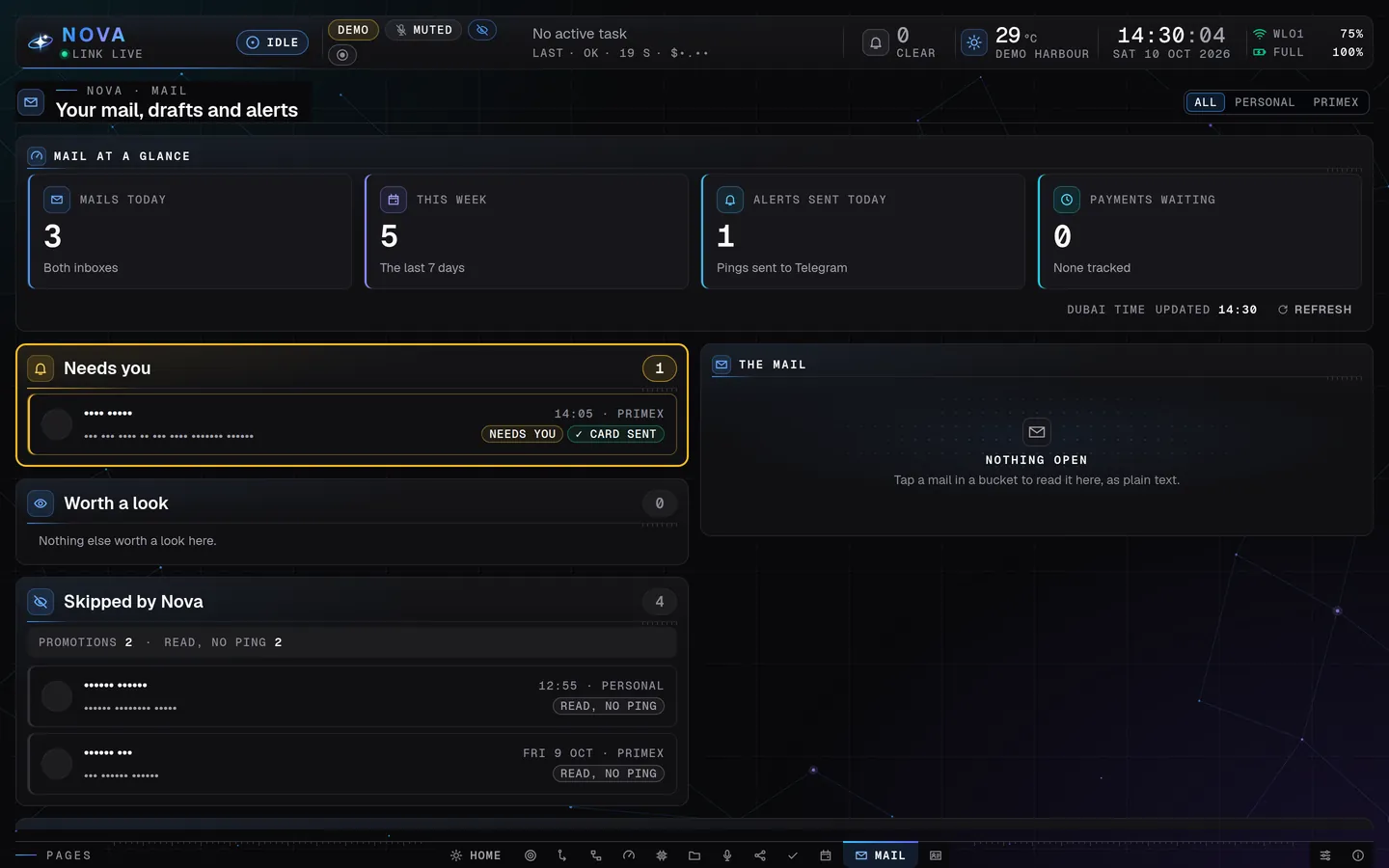
Mail: what needs Aman first, what Nova skipped, and nothing ever sent. Demo mode, made-up data · The Mail page
Mail gets a page of its own, in cards: Needs you, Worth a look and Skipped by Nova (with the reason), from both inboxes.
Morning brief on Telegram
Every morning at 07:30 (Dubai time) Aman gets one Telegram message with the day's agenda from both his calendars and from Nova's own calendar.

All 7 in this area
Mail watching with Telegram cards
LiveNova watches both of Aman's Gmail inboxes (personal and work). For each new mail that matters he gets a Telegram card with a two-sentence summary. Three kinds of card: mail (Draft reply, Later, Done, Mute sender, Open in Gmail), meeting (Brief me, Accept, Decline, Join) and payment (Add to subscriptions, Remind me, Fine, Not me). Newsletters, promotions and spam are skipped.
How it works: Mail watching with Telegram cards
n8n checks the inboxes every 2 minutes. Each new mail is sorted by an AI writer on Claude Haiku that has no tools at all, so a trick written inside a mail cannot make Nova do anything. Then the card goes to his Telegram.
The Mail page
LiveMail gets a page of its own, in cards: Needs you, Worth a look and Skipped by Nova (with the reason), from both inboxes. An open mail is laid out to read, with paragraphs, lists and tables, and earlier messages and the signature folded away. Its buttons do what the Telegram card does: Done, Draft a reply (saved as a Gmail draft, never sent), add to the calendar or undo, Brief me, track a payment, and mute a sender.
How it works: The Mail page
The page reads the mail watch's own records on the laptop. It never draws a mail's own web code and never opens a link by itself, and nothing on the page sends a mail. Presentation mode hides it. Live since 25 to 27 October.
Meetings from mail go onto the calendar by themselves
LiveA mail about a meeting or an event Aman is going to (an invitation, a ticket, a registration) with a clear start time goes onto that inbox's calendar by itself. A Telegram card says "Added to your calendar", with an Undo button.
How it works: Meetings from mail go onto the calendar by themselves
The mail watch adds it as it sorts the mail, at most ten a day, and the Undo takes it off again. Live since 26 October.
Morning brief on Telegram
LiveEvery morning at 07:30 (Dubai time) Aman gets one Telegram message with the day's agenda from both his calendars and from Nova's own calendar.
How it works: Morning brief on Telegram
An n8n automation reads both Google calendars, puts the events in time order and sends them to his Telegram.
Calendar page
LiveAll of Aman's calendars in one place in the Nova window: Month, Week and Day views, today's events, a "Next up" countdown, a colour per calendar and a Join button for video calls.
How it works: Calendar page
The backend reads his calendars on the laptop, read only, through an n8n feed. Clicking an event shows the video call, place, organizer, guests and notes, and "Join in browser" opens the meeting. Presentation mode hides titles and names.
Card taps that do the next step
Being builtA tap on a mail card does the next step. "Draft reply" writes an answer and saves it as a Gmail draft (never sent). "Accept" puts the meeting in his calendar. "Mute sender" stops cards from that sender. "Add to subscriptions" records a payment, and "Not me" raises an alert.
How it works: Card taps that do the next step
The tap goes to an n8n automation on the laptop, which asks Nova's writer for the reply text and saves the draft or the calendar entry. Nothing is sent, paid or deleted. It is switched on but not yet proven end to end.
Sign-in warnings
LiveSome connections stop on a known day (Google while Nova's Google app is still in testing, LinkedIn after 60 days). Nova warns Aman a few days before, and tells him on Telegram once a day if a Gmail, Calendar, LinkedIn or X sign-in has stopped working, so automations never fail silently.
How it works: Sign-in warnings
The daily check reads a short list of sign-ins and their end days: the Google sign-ins are warned on 23 and 24 October, before they run out on the 25th. Every 10 minutes the backend also asks n8n for failed runs that say "needs to be reconnected" or "expired", without changing anything in n8n. Aman is also publishing Nova's Google app, so Google sign-ins stop ending every 7 days.
Everyday abilities
Briefs before a call, tasks and reminders, cards scanned at events and the follow-ups after them.
12 of 17 live
Brief before a call
"Brief me on this company before my call."
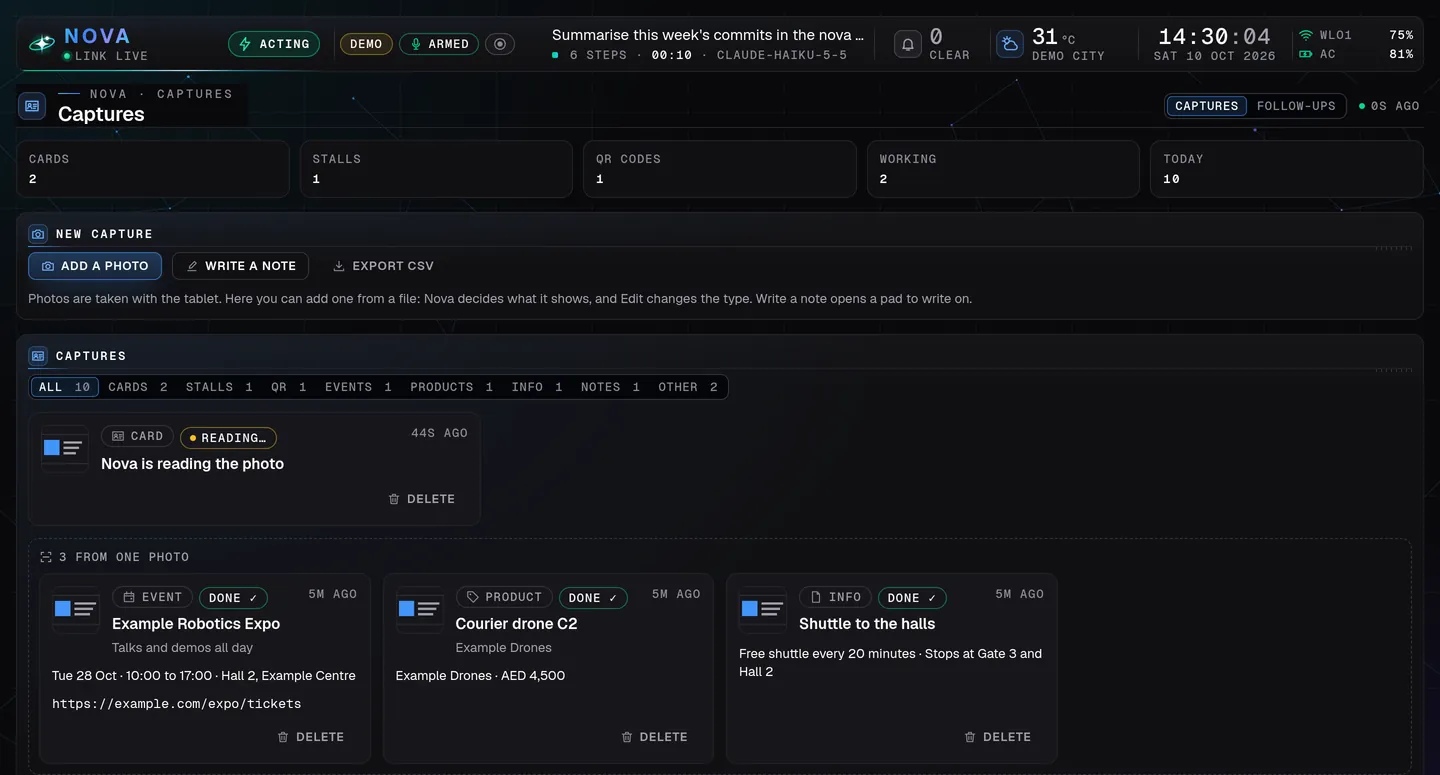
Captures: scan at events, and Nova sorts what it saw. Demo mode, made-up data · Scan at events: cards, stalls and QR codes
One Scan button on the tablet: a photo of a business card, a stall, a QR code, an event poster, a product or a note becomes neat entries on…
Event follow-ups
After an event, Captures has a Follow-ups list of the people Aman met there, from the cards and stalls he scanned.

All 17 in this area
Research reports with sources
Live"Research the best voice AI tools and compare prices." Nova searches the web, compares options and gives a short report with sources and prices, saved as a file.
How it works: Research reports with sources
Nova uses web search and its browser, links every source, and saves the report in its work folder. Bigger research questions go to the stronger Sonnet model.
Brief before a call
Live"Brief me on this company before my call." A short brief on a company or person: who they are, what they do, what to ask, and which of Aman's own offers fits.
How it works: Brief before a call
Nova looks them up on the web, reads Aman's list of offers on the laptop, and writes a one-page brief. A meeting card from his mail also has a "Brief me" button.
Hotel and flight search
LiveAsk for hotels near a beach in Goa, or flights to Mumbai next Friday. Nova searches, shows options in a readable answer, and can open them in its browser.
How it works: Hotel and flight search
Nova uses web search and its own browser.
Notes, ideas, todos and "review my week"
Live"Note: idea for a video about Nova", "todo: call the bank", "done 142", and on Friday "review my week": a short look at what was noted, done and still open.
How it works: Notes, ideas, todos and "review my week"
Nova saves each note on the laptop with a short number, so Aman can close, reopen or delete it later. The weekly review reads them back as a summary.
Reminders
Live"Remind me in 10 minutes to call back", "every Monday at 9 remind me to post." The reminder arrives as a message at that time.
How it works: Reminders
The brain has its own scheduler. Nova creates a timed job, and the message goes out when the time comes. It works from every channel. Since 22 October reminders kept in Nova's own calendar also reach Telegram on time.
The daily check
LiveOnce a day Nova looks at what is due: subscription renewals coming up, website certificates about to expire, and a short Friday line. If something needs Aman, he gets a message.
How it works: The daily check
A timer on the laptop runs the check every hour during the day until that day's check is done. It only reads Nova's own lists. It also says when Nova's post history was not brought up to date for two nights.
Subscriptions and renewals
LiveAsk what you pay each month, add a plan with its price and renewal day, or say that one was cancelled. Nova keeps the list and warns before a renewal. A payment mail card has a button to add the charge to the list.
How it works: Subscriptions and renewals
Nova keeps the list on the laptop and saves a change only after Aman says yes. The daily check reads it and warns before each renewal.
A library of ready-made skills
LiveBeside its 14 own skills, Nova has 59 skills that come with Hermes: YouTube transcripts turned into summaries or threads, research paper search, GitHub, maps and routes, price watching, competitor news, diagrams, infographics, math animation videos, generative art, Word, Excel, PowerPoint and PDF, Notion and Airtable.
How it works: A library of ready-made skills
Each skill is a written recipe Nova reads when a request fits. Some need an account Aman has not connected yet (Notion, Airtable, GitHub), and the Apple ones don't work on this Ubuntu laptop. Most were not tried one by one here.
Tasks for Nova, and a calendar of its own
LiveThe Tasks page holds the tasks Aman gives Nova and his own to-dos. Nova works on his tasks one at a time and shows each step; a task Nova suggests itself waits for his Start. Nova also keeps a calendar of its own.
How it works: Tasks for Nova, and a calendar of its own
Everything sits in one small database on the laptop, the Nova store, which the dashboard and the tablet share. Live since 22 October.
Scan at events: cards, stalls and QR codes
LiveOne Scan button on the tablet: a photo of a business card, a stall, a QR code, an event poster, a product or a note becomes neat entries on the Captures page, up to six from one photo. Nova decides what the picture is and looks up what helps. Aman can edit any entry and delete any capture; a deleted one stays in Recently deleted for 7 days.
How it works: Scan at events: cards, stalls and QR codes
Words written in a picture cannot make Nova do anything else. A picture that looks private is not read, and its photo is removed at once. Live since 26 October.
A pen notes pad
LiveWrite on the tablet with the pen: a name, a number or a note by hand, saved as a contact or a note on the Captures page.
How it works: A pen notes pad
A full-screen pad with palm rejection, an eraser and undo. Nova reads the handwriting as it reads a photo. Live since 26 October.
Event follow-ups
LiveAfter an event, Captures has a Follow-ups list of the people Aman met there, from the cards and stalls he scanned. When he taps Draft (or Draft all), Nova writes a short follow-up for each, and Aman sends it himself.
How it works: Event follow-ups
Nova never sends one. A mail leaves only through his Copy or Open in mail, and a WhatsApp message only after his Yes on a card, once. Nova writes the drafts without seeing anyone's number or address, and none of it is used in a meeting or a scheduled job. Live since 28 October.
Find: a private search over Aman's own things
Being builtOne search over Aman's read mail, meeting notes, event captures and his Nova documents, by words and by meaning, from Home's search field or the key F. Nova can use it too when he asks.
How it works: Find: a private search over Aman's own things
The search and its index stay on the laptop and cost nothing to run. Aman set it up on 28 October and is trying it out; it stays marked as being built until he calls it done.
Site watch and renewal reminders
PlannedEvery day Nova checks Aman's sites and his clients' sites: are they up, and how many days until each certificate and domain ends. "Are my sites up?" It also reminds him before each subscription renews.
How it works: Site watch and renewal reminders
The skills are installed. The timed n8n watch is switched on once Aman gives his two lists (sites, and subscriptions with dates and prices).
Hotel and flight cards with real prices
Planned"Hotel in Bangalore for two nights, under a budget" gives five to eight cards with price, rating, area, free cancellation and a link. Flights work the same way.
How it works: Hotel and flight cards with real prices
An n8n automation uses a travel price service (free up to 250 searches a month), with one tap before each search. It waits for Aman to open the free account and enter its key himself.
Proposals and invoices from Aman's template
Idea"Proposal for a client: automation sprint, two weeks" would fill Aman's own template with scope, steps, price and terms, as Word and PDF. Invoices would work the same way, with a reminder for unpaid ones.
How it works: Proposals and invoices from Aman's template
It needs the document tool (see Coming next) and his template.
Trip planner, price alerts and scene modes
IdeaA one-page trip plan (flights, hotel, weather, calendar entries), "tell me when this flight drops under a price", reading receipts into an expense list, and "client call mode", which opens the right apps and sets the volume.
How it works: Trip planner, price alerts and scene modes
Each would reuse what Nova already has (search, notes, desktop control) plus n8n's clock. None is designed yet.
Background work
Long jobs run in the background with a live task list, and a report when they finish.
9 of 9 live
A live task list for every job
For any job with more than two steps, Nova writes a task list and ticks items off as it works, like Claude Code does.
Background work you can see, with reports
Long work that Nova leaves running, such as a build, shows on the Chat page with a ticking timer, then how it ended: done, failed or stopped.
Told when an automation fails
When one of Aman's n8n automations fails, he gets one Telegram line that day: "An automation failed today: <name>."
All 9 in this area
A live task list for every job
LiveFor any job with more than two steps, Nova writes a task list and ticks items off as it works, like Claude Code does. The Chat page shows it live, with a progress line such as "3 / 7 DONE".
How it works: A live task list for every job
Every dashboard request reminds Nova to keep its list, and the dashboard reads the list every two seconds. The item in progress is lit, done items get a check, and cancelled ones are struck through. The list survives even when the brain shortens a long conversation.
Background work you can see, with reports
LiveLong work that Nova leaves running, such as a build, shows on the Chat page with a ticking timer, then how it ended: done, failed or stopped. If it fails, or finishes after a minute or more, Aman gets a Telegram message.
How it works: Background work you can see, with reports
Every five seconds the backend reads the brain's list of background jobs: what runs now, what ended in the last 24 hours and, for a failure, its last line. Nova is taught to look at a job before saying it is running, and to answer "how is it going?" from the job itself.
Nova builds software, and has improved itself
Live"Add a page to the Nova window that shows ..." For bigger software jobs Nova starts a build of its own on Claude Opus. It has already built new parts of itself: the ranking page on the Social page, its Telegram button kit and the tap buttons for X. It always works on a copy, never on the live system.
How it works: Nova builds software, and has improved itself
One helper runs the build in a copy of the project and logs its progress (see the next feature for whose key pays). The build shows under background work, and Aman gets a Telegram message when it ends. A finished copy goes live only after it is checked and Aman says yes. Since 27 October the development of Nova itself is Claude's work; Nova builds only what Aman asks it for himself, and manages the rest.
Nova builds its own automations in n8n
LiveAman asks Nova to build, change, test and run an automation ("watch my mail and send me cards"), and Nova makes the n8n workflow itself.
How it works: Nova builds its own automations in n8n
Nova has n8n's own tools and a skill that teaches it to build and test safely: sending steps are faked during tests, and a workflow that posts stays off until Aman's yes.
Told when an automation fails
LiveWhen one of Aman's n8n automations fails, he gets one Telegram line that day: "An automation failed today: <name>." A sign-in that has run out keeps its own message (Sign-in warnings).
How it works: Told when an automation fails
Every 10 minutes the backend reads n8n's list of failed runs (the automation's name and id, never what the run held). Each automation is told at most once a Dubai day, and the message begins "From the laptop (not a reply):" like everything the laptop sends. Live since 20 October 02:15. Nova's own builder wrote it, and Claude reviewed it before it went in.
Nova's own builds, on its own account
LiveNova's big builds run on Nova's own Claude account instead of Aman's, so his own Claude usage stays free. Since 27 October it builds only what Aman asks it for himself.
How it works: Nova's own builds, on its own account
A helper starts a separate run of Nova's own brain on Claude Opus in a copy of the project, with a time limit for each build. It shows in the Task box as a Nova build.
Websites through GitHub and Vercel
LiveNova and Claude change Aman's websites only through pull requests on their own branches, and his merge on GitHub is his yes. A change to a live site, a setting or a domain needs his tap on a Telegram card.
How it works: Websites through GitHub and Vercel
Nothing is ever forced, and nothing is merged without him. Live since 24 and 25 October.
Your sites on the Projects page
LiveA card on the Projects page shows Aman's sites: the latest Vercel builds and the open pull requests. A failed build or a pull request that waits sends a short Telegram line.
How it works: Your sites on the Projects page
The backend looks at Vercel and GitHub every few minutes, at most twelve lines a day. Live since 25 October.
This website
Livenova.primexmeta.com shows what Nova does, its interface, a changelog and articles. Nova is a product of PrimeX Meta, Aman's company. The feature list on the site comes from Nova's own records after a public review.
How it works: This website
The site is a Next.js project on Vercel, at nova.primexmeta.com since 29 October. Every change goes through a pull request and goes live when Aman merges it. A Sunday update is built and waits for Aman's word to switch it on: Nova would write the week's changes as an article, two privacy checks read it, and it goes live only when Aman taps Publish. Live since 25 October.
Cost and usage
What every request costs, counted to the smallest decision, under one daily limit.
5 of 5 live
Usage and cost page
One page shows what Nova costs today and this month, model by model, with nothing hidden: Claude for each model, OpenAI speech, ElevenLabs…
Even the tiny decisions are counted
Nova uses a small, cheap judge model for quick decisions, such as which brain to use or whether a meeting line was meant for it.
One daily limit for all of Nova's work
Nova's own work is counted against one daily limit across every channel together: the window, voice, Telegram, WhatsApp, the tablet…
All 5 in this area
Usage and cost page
LiveOne page shows what Nova costs today and this month, model by model, with nothing hidden: Claude for each model, OpenAI speech, ElevenLabs voice credits and the small judge model.
How it works: Usage and cost page
The backend reads token counts from the brain's records and prices them from one price list covering Haiku, Sonnet and Opus. A bar shows where today's cost goes, and each model has a card with calls, tokens, cache use and roughly what one call cost. Every figure is marked EST (estimate), and a part that is not counted says so instead of showing zero. Aman has also set spend limits in the Claude and OpenAI consoles.
Voice costs: OpenAI and ElevenLabs
LiveAman sees what voice costs: speech-to-text and OpenAI speech, ElevenLabs credits and characters today and this month, and the lines played for free from the laptop, all beside the Claude cost in one total.
How it works: Voice costs: OpenAI and ElevenLabs
Nova counts each spoken piece from the provider's own numbers and books it with a price list kept on the laptop. Roughly: OpenAI speech about 2 cents a minute, ElevenLabs about half a credit per character.
Even the tiny decisions are counted
LiveNova uses a small, cheap judge model for quick decisions, such as which brain to use or whether a meeting line was meant for it. Its cost is shown too.
How it works: Even the tiny decisions are counted
Every judge call is counted from the provider's own token numbers (never the words) and priced. It appears as "Judge (TypeSafe)" and is included in the totals.
One daily limit for all of Nova's work
LiveNova's own work is counted against one daily limit across every channel together: the window, voice, Telegram, WhatsApp, the tablet, meetings, tasks and scheduled jobs. Past it, a new request from Nova Desktop or the tablet, typed or spoken, waits for Aman's yes on the laptop, and so does a new task. A request already running, a meeting or a task in progress is never cut.
How it works: One daily limit for all of Nova's work
The count comes from the same records as the Usage page, priced the same way, and builds keep limits of their own. Aman gets one Telegram line the first time it is reached on a day. Live since 25 October.
Developer view on the Usage page
LiveThe Usage page has a second view, Developer, for how Nova itself is being built: a summary at the top (total cost, tokens in and out, how much was done), then each part of Nova and each day since 10 October.
How it works: Developer view on the Usage page
It joins the estimate of Claude Code's work on the laptop with what Nova's own builds used. Live since 24 and 25 October.
Safety and privacy
Only Aman gives orders, his yes comes before anything that leaves, and everything stays on one laptop.
11 of 11 live
Only Aman gives orders
Nova takes requests only from Aman. Strangers who message it on Telegram or WhatsApp get no reply.
Aman's yes before buying, paying, sending or deleting
Nova does ordinary work on the laptop without asking.
Nightly backups, checked every time
Every night Nova's whole setup is copied to the laptop's big disk and checked file by file, and old copies are pruned.
All 11 in this area
Only Aman gives orders
LiveNova takes requests only from Aman. Strangers who message it on Telegram or WhatsApp get no reply. In Google Meet, others can get spoken answers but cannot give orders.
How it works: Only Aman gives orders
Telegram is locked to his account and WhatsApp ignores unknown senders. Nova's persona says only Aman's own messages are requests, and text from web pages, mails or files is treated as a stranger's words.
Aman's yes before buying, paying, sending or deleting
LiveNova does ordinary work on the laptop without asking. It waits for Aman's yes before anything that buys, pays, sends to other people, posts in public or deletes. By voice, it says aloud that it needs his authorization.
How it works: Aman's yes before buying, paying, sending or deleting
The rule is written into Nova's own instructions on every channel, and a yes in the dashboard counts as much as one on Telegram. Since 25 October a "Yes, once" / "No" card also holds those steps when Nova uses its browser or the desktop.
Private: everything stays on the laptop
LiveNova runs on Aman's own laptop, with no cloud server and nothing open to the internet. Meeting sound never leaves the laptop. The only things going out are calls to the AI models and services he chose.
How it works: Private: everything stays on the laptop
Every service listens only on the laptop itself, and the firewall blocks incoming traffic. Presentation mode hides private text and money while recording.
Only Aman handles his own sign-ins
LiveAman types his own sign-ins himself, in his own terminal, never in a chat. If he gives Nova one himself, Nova uses it only where he says and never passes it on.
How it works: Only Aman handles his own sign-ins
One tool takes it without showing it on screen. Snapshots and backups are checked so that nothing private is copied into them.
Emergency stop and microphone off
LiveOne command stops all of Nova's work at once. Another switches Nova's microphone off from anywhere, even when the dashboard doesn't answer.
How it works: Emergency stop and microphone off
The stop command ends every running request, pauses the brain and stops the services. The microphone command remembers "off", and nothing spoken can switch it back on.
Nightly backups, checked every time
LiveEvery night Nova's whole setup is copied to the laptop's big disk and checked file by file, and old copies are pruned. A restore guide sits beside the backups.
How it works: Nightly backups, checked every time
A timer runs the backup at about 03:30. The copy of 18 October held 13,869 files and 27 databases (about 308 MB) and was complete and verified in 13 seconds. Since that day it also holds Nova's work folder (its Telegram kit and its writer for n8n) and the dashboard's own state.
A dated snapshot after every finished job
LiveEach finished piece of work is saved as a dated snapshot, so any change can be looked at again or undone.
How it works: A dated snapshot after every finished job
The snapshots are a local history, made through one tool that first checks that nothing private is inside. They are never pushed anywhere.
Honest health checks and a restore drill
LiveNova's health check is accurate, and its verdict on the healthy system is OK. A restore of the newest backup was rehearsed, and code that runs live but was in no backup is now in it.
How it works: Honest health checks and a restore drill
The check tools were rewritten in a copy and tested against the live system before they came in, on 18 October.
A watcher outside Nova's brain
LiveA small checker that does not depend on Nova's brain or the dashboard tells Aman on Telegram when something important is wrong: the brain is down, a backup is missing, a disk is nearly full or a safety setting changed. On Mondays it sends one line that it is still watching.
How it works: A watcher outside Nova's brain
It looks every few minutes, tells a thing only after seeing it twice, and writes under its own heading, never inside Nova's conversation. Nova's own builder wrote it; Claude checked it and switched it on.
Nova's hands, seen: a step list, a band and an alarm
LiveEvery page Nova opens and every button it presses, in its own browser or in an app, is listed on the System page ("Nova's hands, today"). While Nova is using its browser or the screen, a green band under the top bar says so, and a risky step also sends Aman a Telegram line.
How it works: Nova's hands, seen: a step list, a band and an alarm
The backend reads the brain's own record afterwards, so Nova is not slowed down. It keeps the time, the chat, plain words, the site or app and the button's name for 30 days; never what was typed, a page's text or an address's path. In presentation mode the band leaves the site or app out.
Guards beside the browser and the hands
LiveMore safety layers stand beside Nova's browser and desktop control, without taking any ability away: a "Yes, once" / "No" card before Nova buys, pays, sends, posts or deletes, a stop for its hands that only Aman can lift, and a notice on the laptop.
How it works: Guards beside the browser and the hands
Live since 25 October.
Nova Recorder
Records the screen and both voices for YouTube, with private text hidden while it records.
5 of 9 live
Record the screen for YouTube
"Hey Nova, start recording."
Aman's voice and Nova's voice, on separate tracks
The video carries Aman's microphone and Nova's spoken answers mixed together, and each one is also kept as its own clean track for editing.
Private text hidden and alerts quiet while recording
While a recording runs, the Nova window hides private things (approval commands, message snippets, job names, amounts), dashboard alerts…
All 9 in this area
Record the screen for YouTube
Live"Hey Nova, start recording." Nova records the Nova window, the big screen, the laptop screen or both screens, can pause, resume and stop, and says how long and how big the recording is. Recording mode makes the Nova window full screen and shows a 3-2-1 countdown that does not end up in the video.
How it works: Record the screen for YouTube
A small recorder of its own uses the desktop's built-in screen capture, so no pop-up appears and the desktop's red recording dot shows. The graphics chip encodes the video, using about 2 to 3% of one processor core, and the video is saved in one-minute parts so a crash can't break the file. Files stay on the laptop's big disk, named by date. Nothing is uploaded.
Aman's voice and Nova's voice, on separate tracks
LiveThe video carries Aman's microphone and Nova's spoken answers mixed together, and each one is also kept as its own clean track for editing.
How it works: Aman's voice and Nova's voice, on separate tracks
The recorder takes the microphone and the laptop's sound on the same clock as the picture. "Hey Nova" keeps working during a recording, and the meeting's sound devices are never used.
Chapter markers by voice
Live"Hey Nova, mark this: the setup" puts a chapter marker in the recording. After editing, the markers become the "0:00 Intro" chapter lines for the YouTube description.
How it works: Chapter markers by voice
The marker is placed at the moment "Hey Nova" was heard, not when the command finishes. Chapter times follow the cuts and speed-ups, and YouTube's chapter rules are applied (first chapter at 0:00, at least three chapters, at least 10 seconds apart).
Webcam in the corner
Being builtAman's webcam can appear in a corner of the video, rounded, with a thin blue ring in Nova's colour. It's off unless he asks.
How it works: Webcam in the corner
The camera is recorded to its own file and placed in the corner at export, so it can still be moved or dropped later. The first real recording with the camera (19 October) came out black while the screen and the sound were fine; the cause is being checked (a closed lens cover is the first guess).
Editing tools: captions, thumbnail, trim, export
LiveAfter recording, Nova makes captions, picks a thumbnail frame, trims, joins and speeds up parts, adds title cards, and exports one YouTube-ready video.
How it works: Editing tools: captions, thumbnail, trim, export
Captions come from a speech model running on the laptop, so no sound is sent out, and Aman reads them before uploading. The big screen exports at 1440p, which YouTube streams at higher quality. A 10-minute video takes about 5 to 6 minutes to export.
Global key, silent phrases, one-window recording
PlannedCtrl+Alt+R starts or stops a recording from anywhere. Short silent phrases such as "Nova, mark this" and "Nova, stop recording" work at once, with no spoken reply in the video. A mode records only the Nova window.
How it works: Global key, silent phrases, one-window recording
Recording only the Nova window works since 24 October. The key is set in the same sitting as the microphone key. The silent phrases come only after a test of false wake-ups with Aman's own voice.
Upload to YouTube
PlannedIf Aman wants it, Nova uploads a finished video to his channel as private or unlisted, and it becomes public only after his tap.
How it works: Upload to YouTube
n8n's own YouTube connector, with the channel signed in by Aman himself. Until then he uploads in YouTube Studio with the files Nova prepared.
A video editor and better cutting
PlannedOptional installs for better editing: a full video editor (Kdenlive or Shotcut), lossless cuts, one crash-safe file and microphone noise suppression.
How it works: A video editor and better cutting
Aman runs a small install command himself. Editor caches go to the big disk.
On the way
What is being built and planned, shown as exactly that and never as live.
6 on the way, 1 live
All 7 on the way
Documents tool and Documents page
PlannedAman sends a deck or a Word file on Telegram and says "update this". Nova changes it, lists what changed, shows before-and-after pictures and returns the new file. The original is never changed, and undo works. New slides, PDF reports, proposals and invoices from his template come with it, plus a Documents page on the dashboard (Ctrl+9 is kept for it).
How it works: Documents tool and Documents page
A closed box on the laptop with no internet and no keys. Aman said "build it" on 19 October; the box reads all four kinds of file, and since 20 October it changes PowerPoint and Word files (his decks are PowerPoint). The box was switched on on 21 October and passed its first live check in the Nova window; Aman's own checks of it come next, then Excel and PDF changes and the Documents page.
A locked backup copy off the laptop
PlannedEvery night an encrypted copy of Nova's backup would leave the laptop for cloud storage, so a dead disk or a stolen laptop loses nothing. Only Aman can open it.
How it works: A locked backup copy off the laptop
It is encrypted before it leaves, and stored so that the laptop itself cannot read or delete it early. Built and reviewed, not switched on yet: it waits for a short sitting with Aman.
A small online history (Supabase)
PlannedA small online history of every post after it went out, and later leads from Aman's site, in a Supabase project made only for Nova.
How it works: A small online history (Supabase)
Only this small history goes there. Chats, memory and keys stay on the laptop. It comes after the first posts work.
A final whole-system test
PlannedOne final acceptance test of the whole system with Aman present, including one planned restart and a restore he watches.
How it works: A final whole-system test
A checklist from the backup and safety plan. Every check that doesn't need him runs first.
Awake with the lid closed, and Chrome updating itself
LiveThe laptop keeps Nova running with the lid closed while on the charger, and Chrome gets its security updates automatically.
How it works: Awake with the lid closed, and Chrome updating itself
Two small system settings in one prepared command that Aman ran himself on 19 October. Each part shows what it changes and has a way back.
An always-on server for automations
IdeaA small server could run n8n around the clock, so timed jobs run while the laptop is closed. Nova's brain would stay on the laptop.
How it works: An always-on server for automations
His answer for now is "no server this month".
A full copy of the laptop on an external drive
IdeaA complete copy of the laptop, operating system included, on an external drive, so everything could be started again from it.
How it works: A full copy of the laptop on an external drive
It was designed once and then parked by Aman ("we will do it later"). Nothing is built or bought until he asks again.
No feature matches. Try another word, or clear the filters.
Every week
Social media
Drafts posts for X and LinkedIn that wait for Aman's yes, then posts exactly that text.
11 of 13 live
Post on X when asked, after his yes
"Post this on X." Nova shows the exact text first and posts only after Aman says yes.
How it works
Social approvals: the Check card, where the first tap counts
Aman's X cards, the topic list and the post drafts, can be answered on the Social page's Check card as well as on Telegram.
How it works
LinkedIn posts
Nova posts on Aman's LinkedIn on request, after showing him the exact text and getting his yes.
How it works
All 13 in this area
X posts from trending AI news, with Approve / Redo / Reject
LiveUp to four times a day, at good hours, Nova sends Aman the top four AI stories on Hacker News as tappable topics on Telegram. He taps one and Nova writes an X post about it. Then he taps Approve (it posts exactly that text, with the link as a reply), Redo (Nova writes it again) or Reject (nothing is posted).
How it works: X posts from trending AI news, with Approve / Redo / Reject
An n8n automation picks the time and gathers the stories. Nova's writer, which runs on Claude Sonnet and has no tools, writes the post from the story and the article. A Telegram button add-on that Nova built itself sends his taps back to n8n. Nothing is posted without his Approve tap.
Post on X when asked, after his yes
Live"Post this on X." Nova shows the exact text first and posts only after Aman says yes.
How it works: Post on X when asked, after his yes
Nova runs an n8n automation that holds the X connection, so Aman's X account details never pass through a chat.
LinkedIn posts
LiveNova posts on Aman's LinkedIn on request, after showing him the exact text and getting his yes.
How it works: LinkedIn posts
An n8n automation holds the LinkedIn connection and is run once, by hand, for each approved text.
X drafts on the Social page
LiveIn set time slots, Nova writes tech post drafts for X. They show in a "Drafts on X" panel on the Social page, each marked "needs Aman yes". Nothing is posted from there.
How it works: X drafts on the Social page
An n8n automation reads a tech news feed and writes up to four drafts a day. The dashboard reads them, read only, and shows the time, slot, text and source.
Trending AI stories, ranked
LiveEvery 6 hours Nova scans Hacker News for new AI stories and lines them up as post and video ideas. The Social page shows them ranked by score ("Queue by score"). Nova built this page itself.
How it works: Trending AI stories, ranked
A scheduled job only reads Hacker News and writes the queue; it never posts. The dashboard lists the stories highest score first, with rank, points and status. Paused since 27 October (Aman's choice); it comes back on his word.
What was posted
LiveA log of everything Nova posted, on X and LinkedIn today and other platforms later, with time, result and the post text.
How it works: What was posted
Nova writes one line per post and the Social page reads it: newest first, sent or failed (with X's reason), and counts per platform. Presentation mode hides the texts.
Hacker News story cards on Telegram
LiveEach waiting AI story comes to Telegram as its own card with Approve, Skip and Open buttons. A tap marks the story approved or skipped.
How it works: Hacker News story cards on Telegram
A scheduled job sends the queue as cards through Nova's Telegram button kit. It only sends cards, never posts. It was fixed on 18 October and runs every 6 hours (12 runs of the job since 17 October by 19 October 21:34, the last one ok). Paused since 27 October (Aman's choice); it comes back on his word.
Tap-approved posts in the posted list
LivePosts approved with a Telegram tap, and failed tries with X's own reason, show in "What was posted" with all the others.
How it works: Tap-approved posts in the posted list
A tool reads n8n's past runs, counts only real taps (not tests), and writes each post into the log the Social page reads. It runs by itself every night at 03:00, before the backup, so a tap post is in the list the next morning. To show one at once, run it by hand right after the tap.
The Social page in cards
LiveThe Social page opens in cards: today's X draft waiting for Aman's OK, a post to check (shown only while one waits), today's news with its rank, what was posted on each platform, and what was done today.
How it works: The Social page in cards
The cards read the same records as before; approving still happens on Telegram. Live since 27 October.
X trends on the Social page
LiveA Trending card shows the topics trending on X that Nova's daily look found, with older ones marked as old.
How it works: X trends on the Social page
The X automation reads the trends once a day and keeps them; the page asks for them at most every ten minutes. Live since 27 October.
Social approvals: the Check card, where the first tap counts
LiveAman's X cards, the topic list and the post drafts, can be answered on the Social page's Check card as well as on Telegram. Whichever he taps first counts.
How it works: Social approvals: the Check card, where the first tap counts
A draft waits for his yes on his phone or on the dashboard, and Approve asks once more before anything is posted. Live since 28 October.
LinkedIn with Approve buttons, and a full post outbox
PlannedLinkedIn gets the same Telegram flow as X: Nova suggests a post, Aman taps Approve, Redo or Reject. A full outbox with a calendar of planned posts is also designed.
How it works: LinkedIn with Approve buttons, and a full post outbox
Built like the X button route in n8n. Aman chooses between the button route and the full outbox.
X account monitor
IdeaNova would report new mentions and follower counts on X.
How it works: X account monitor
Only a switched-off sketch exists. Each read costs X credit, so it waits for Aman's yes and a daily cap.